

Power BI Line and Clustered Column Chart
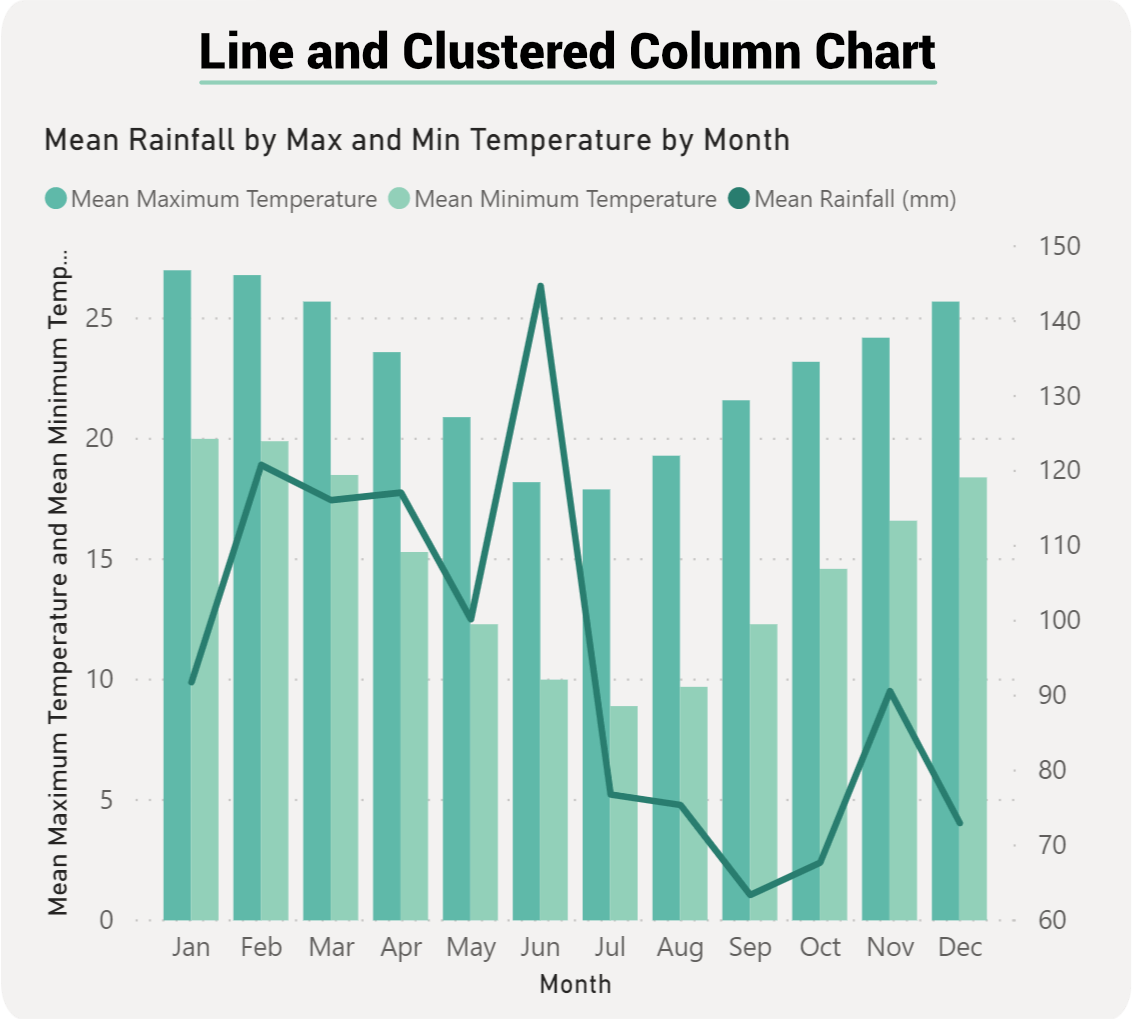
A Line and Clustered Column Combo Chart in Power BI combines a line chart and a clustered column chart into one visualization. This combination allows you to simultaneously display two different types of data, typically with different scales, on a single chart
For instance, you could have monthly sales figures displayed as clustered columns and the sales growth rate for each month displayed as a line. The clustered columns might be measured in thousands of dollars, while the growth rate is expressed as a percentage.
Benefits of using a Line and Clustered Column Chart:
The main benefit of this type of chart is that you can have one or two Y axes. What this means is that you can either display two measures that would have the same Y axis, something like Total Sales and Profit. Or, we could show two measures that are based on completely different values such as Order Quantity and Profit. Other benefits include:
Dual Axis Visualization: This chart type allows for a dual axis visualization, meaning you can represent two measures with different scales in one chart. This can be especially useful when you want to show a correlation or contrast between two sets of data.
Versatility: It’s suitable for various scenarios, from financial metrics to inventory tracking.
Clarity: By combining two data visualizations into one, you can reduce clutter in your reports and make your insights clearer to your audience.
Comparison: It’s easier to compare data trends when they are in one visualization rather than flipping between two separate charts.

Best Practices When using Line and Clustered column chart:
Use Distinct Colors: Make sure the line and columns are easily distinguishable by using contrasting colors.
Limit Data Points: Avoid overwhelming your audience with too much data. Stick to the most relevant data points for clarity.
Consistent Timeframes: If you're using time as an axis (e.g., months, years), ensure consistency in intervals.
Use Clear Labels: Clearly label both the primary and secondary axes to avoid any confusion.
Avoid Overplotting: If you have multiple lines or column clusters, ensure they are not too crowded, which could make the chart unreadable.
Use Cases of a Line and Clustered Column Chart
Financial Analysis: Track monthly sales (as columns) against profit margins (as a line).
Inventory Management: Display monthly product sales (as columns) alongside inventory levels (as a line).
Marketing Metrics: Showcase monthly website visitors (as columns) versus conversion rate (as a line).
Operational Metrics: Compare monthly production output (as columns) against defect rate (as a line).
Line and Clustered Column Chart vs. Line and Stacked Column Chart:
Both the Line and Clustered Column Chart and the Line and Stacked Column Chart are popular visualization tools in Power BI, and while they share similarities, they have distinct applications. Let's delve into their practical differences and the case studies best suited for each.
Line and Clustered Column Chart:
Description:
This chart type combines a line chart and a clustered column chart. The columns are grouped side-by-side based on categories, allowing for a direct comparison between individual categories.
Practical Differences:
Distinct Comparisons: It emphasizes individual category values and is ideal for comparing the absolute values of each category.
Dual Axis: Typically used when the line and column values have different scales.
Clarity in Individual Data Points: Since the columns are clustered, it's easier to compare individual data points within a category.
Line and Column Column Chart is Most Suitable for:
Sales Analysis Across Multiple Products: Imagine a company that sells multiple products. Using this chart, they can showcase monthly sales of each product (clustered columns) against the overall monthly growth rate (line). It allows stakeholders to see how each product is performing in terms of sales, and how this contributes to the overall growth rate.
Line and Stacked Column Chart:
Description:
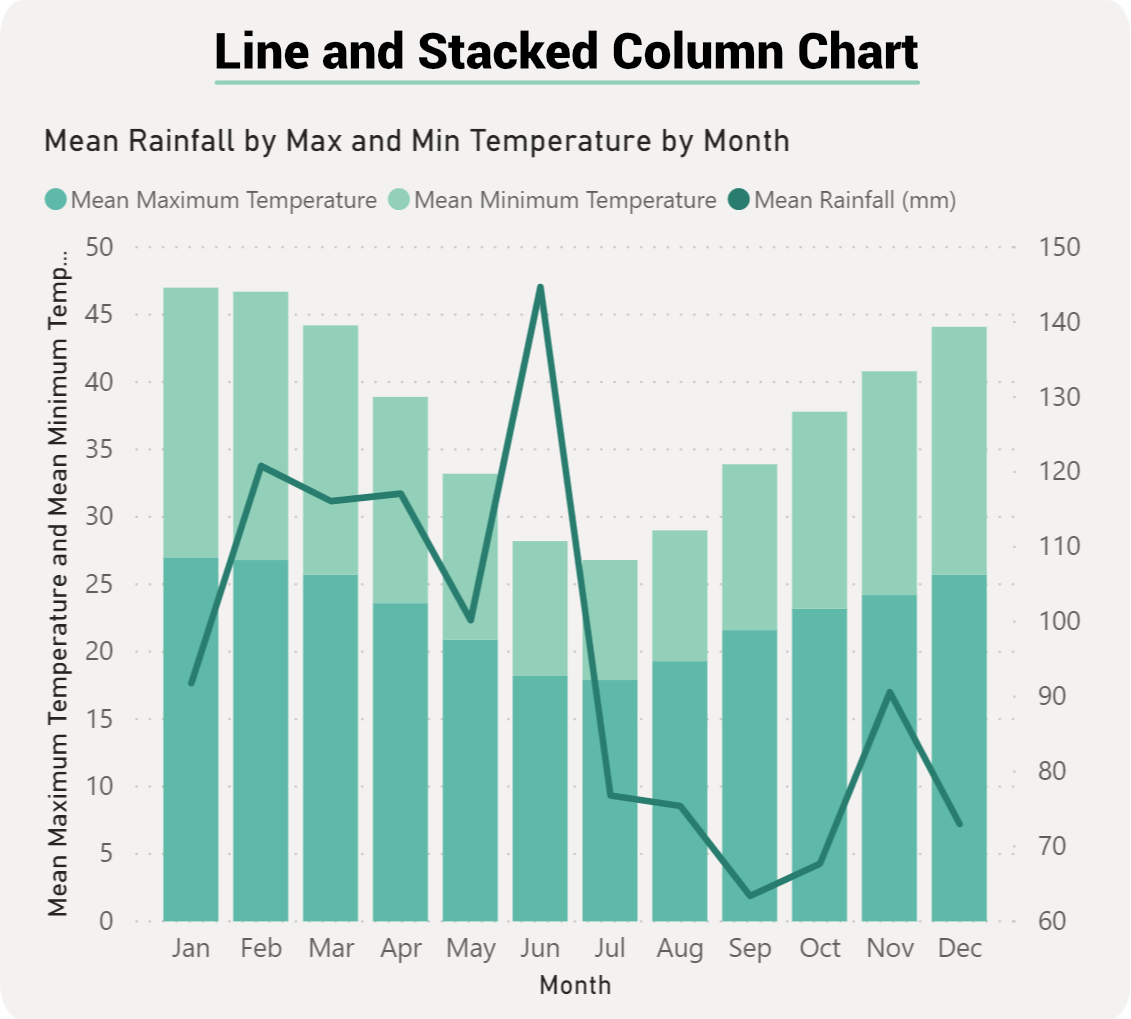
This chart type integrates a line chart with a stacked column chart. The columns are stacked on top of one another, representing the cumulative total of the categories.
Practical Differences:
Cumulative Comparisons: It emphasizes the total value of all categories combined, while still breaking down the contribution of each category.
Portion Analysis: Allows for the analysis of individual category's portion or share of the total.
Dual Axis: Like the clustered variant, it's commonly used when the line and column values have different scales.
Line and Stacked Column Chart is Most Suitable for:
Website Traffic Analysis: Consider a website that gets traffic from various sources like direct visits, social media, search engines, and referrals. Using the Line and Stacked Column Combo Chart, the company can display the monthly total traffic (stacked columns with each source's contribution) against the website's monthly bounce rate (line). This visualization provides insights into the traffic contribution from each source and how it correlates with the bounce rate.
Pros and Cons of a Line and Clustered Column Chart:
The Line and Clustered Column Chart is a versatile visualization tool, but like any chart type, it comes with its own set of advantages and disadvantages. Let's explore the pros and cons:
Pros:
Dual Visualization: It combines two types of charts, allowing for a richer representation of data. This is particularly useful when trying to convey two distinct data points or metrics simultaneously.
Dual Axis: The ability to have two Y-axes can be very beneficial when the data points have different scales. For example, you can showcase sales figures (in thousands or millions) alongside growth rate percentages.
Clear Comparisons: The clustered columns make it easy to compare values across categories. For instance, if you're comparing sales of different products month by month, the clustered columns provide a clear side-by-side comparison.
Flexibility: It can be used in various scenarios, from financial analyses to operational metrics, making it a versatile tool in your data visualization toolkit.
Reduces Need for Multiple Charts: Instead of having separate line and column charts, you can combine the data into one chart, reducing clutter in your reports.
Cons:
Potential for Overwhelming Information: Combining two charts means you're presenting double the information, which can be overwhelming for some viewers if not designed thoughtfully.
Scale Differences Can Be Misleading: If not careful, having two different scales (dual Y-axes) can sometimes be misleading. The viewers might mistakenly think that changes in the line graph are as significant as changes in the column graph, even if they represent different magnitudes.
Requires Careful Design: It's crucial to use contrasting colors and clear labels to ensure that the chart is easily interpretable. Poor design choices can make the chart confusing.
Not Always Intuitive: For those unfamiliar with dual-axis charts, it might take a moment to understand what's being presented. There's a learning curve for some users.
Risk of Overplotting: If there are too many data points or categories, the clustered columns can become crowded, making the chart harder to read.
Conclusion:
While the Line and Clustered Column Combo Chart offers a powerful way to visualize and compare data, it's essential to use it judiciously. Careful design, clear labeling, and an understanding of your audience's familiarity with such visualizations will ensure that the chart effectively communicates the insights you want to convey.