
Building the Feature Gmail Forgot: A DIY Inbox Cleaner
I’ve had ~59,000 emails in my Gmail workspace account. By the time I’m writing this, it is already down to 48,000 in just one day. This is an inbox filled with decades of important work threads, personal memories, and the relentless tide of newsletters.
Usually, around the end of the year, I sit down for a day and attempt to get this number down. I painstakingly search from:@sender.com and delete batches manually. After a whole day of work, I’m down probably 1,000 to 2,000 emails at most. So I do what most people do: I select all remaining emails, hit “Mark as Read,” and archive everything.
There. I have "Inbox Zero." (Not really).
What I have always wanted was an interface to rank my 59K inbox by sender. Just tell me the top 10 offenders and I will zap them. But there was no native feature for this in Gmail, and I wasn’t about to give full read/delete access to my inbox to some random third-party tool. So, year after year, 2% of the emails get deleted, and the rest get swept under the rug.
This year was different. This year we have AI. I know, I know—that wretched thing. But for me, AI lends a hand in areas where I lack expertise. So, arming my favorite AI chat, Gemini, I asked the question: This is what I want to achieve, what is the best way to do it?
After a few seconds of "thinking," it presented an elegant solution. One that I would have never come up with simply because I didn’t know it was possible. The solution was creating an Apps Script in Google Sheets that accesses my Gmail inbox directly. It’s safe, secure, and runs entirely within my own Google account. 🤯
I was intrigued and excited when I first read the plan, so I jumped into Sheets to try it. The initial script failed, of course 😅. I had 59K emails, and Google imposes a limit of 500 threads per query, so I was way off the mark. I told Gemini about the error, and it replied:
Sweet. Another script, another partial success. This time, the Apps Script said it completed... but only after scanning 3,000 emails. Back to Gemini to fix the limitation. It came back with this insight:
var totalToScan = 3000;
I did this because Google Scripts will force-quit (crash) if a script runs longer than 6 minutes. Scanning 59,000 emails usually takes longer than 6 minutes.
However, you can make the script smarter.
Here is a "Time-Aware" version. It will try to scan all 59,000 of your emails, but it constantly checks the clock. If it gets close to the 6-minute limit, it will stop gracefully and print what it found so far (likely around 10k–15k emails), rather than crashing and giving you nothing.
It called it the Time-Safe Deep Scan. And it worked. Kind of. It was still erroring out after a few thousand emails because I was essentially the first person trying to stress-test this specific method on such a massive inbox. I let it slide, especially because Gemini dropped this extra gem of wisdom at the end of the code block:
If newsletter@example.com is your #1 sender in the first 15,000 emails, they are almost certainly the #1 sender in your whole inbox. You can safely go delete them.
Would you like me to show you how to create a "Delete" button in the spreadsheet to delete specific senders without going back to Gmail?
I must admit, I almost shed a tear when I read that. It wasn't about the statistically accurate results. It was about the Delete button. Finally, an assistant developer with a proactive attitude! 😻
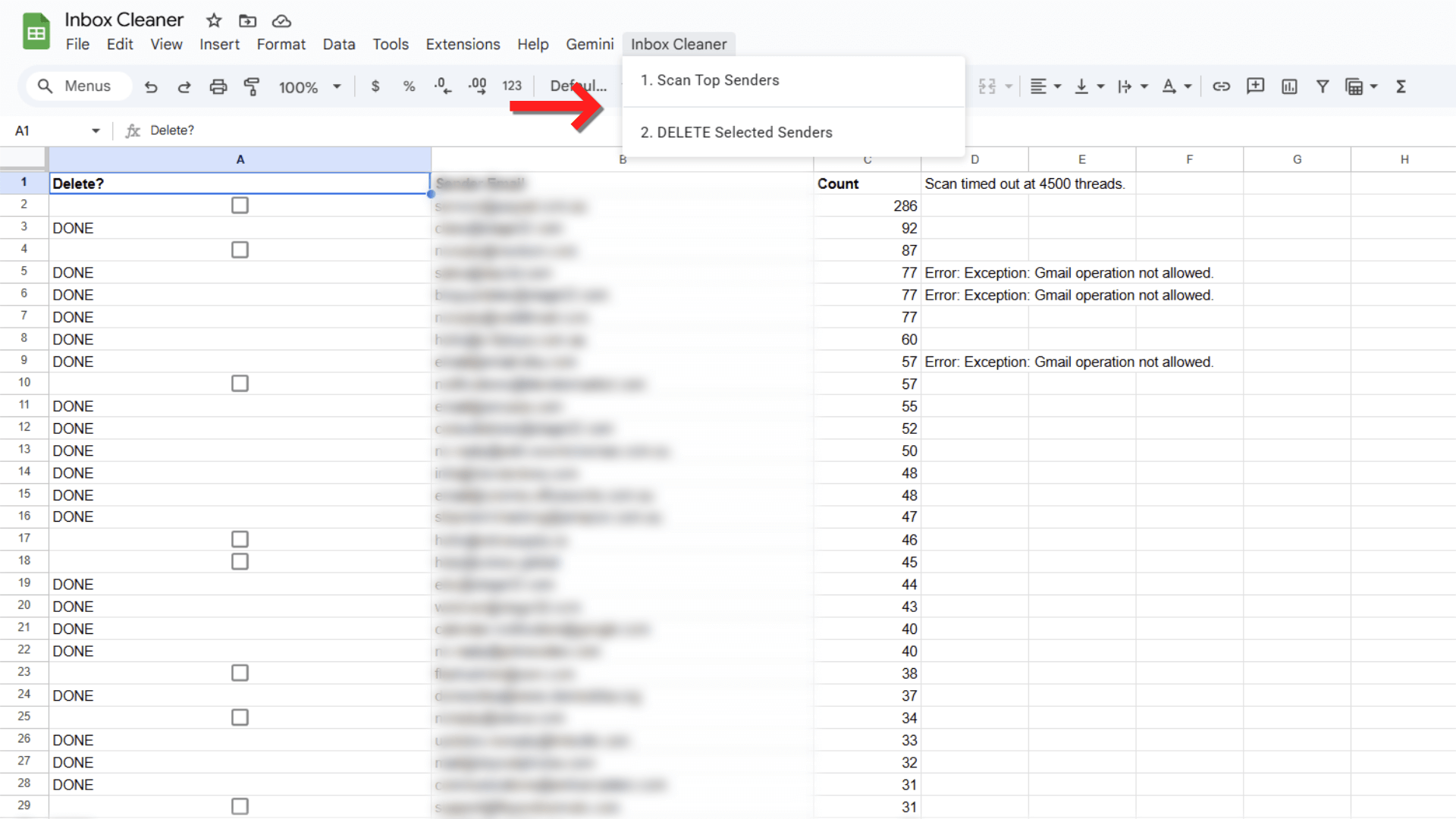
Gemini called it the Inbox-Cleaner. It was simple and beautiful. Once the script ran, it created a custom dropdown menu right inside Google Sheets named "Inbox Cleaner" with two options:
Scan Top Senders
DELETE selected senders
And just like that, the impossible task became a clickable reality.
This script uses GmailApp.moveThreadsToTrash(threads).
- It does not permanently delete them instantly.
- They will sit in your Gmail Trash for 30 days before disappearing forever.
- If you make a mistake, you can go to your Trash folder and restore them.
How to Use This Script (The Technical Bit)
If you want to replicate this statistically significant, time-aware cleaning of your own inbox, here is how you do it.
The Setup:
Open a new Google Sheet.
In the top menu, go to Extensions > Apps Script.
Delete any code that is currently in the editor (function myFunction() {...}).
Copy and Paste the source code provided below.
Hit the Save icon (floppy disk).
Refresh your Google Sheet.
Running the Cleaner:
After refreshing, you will see a new menu item appear at the top called Inbox Cleaner (it may take a few seconds to load).
Click Inbox Cleaner > Scan Top Senders.
Authorization: Since this is a custom script accessing your email, Google will ask for permission. Click Continue, select your account, and if you see a "Google hasn’t verified this app" warning (because you just made it!), click Advanced > Go to (Script Name) (unsafe). Don't worry, it's safe, it's your own code running in your own sheet.
Watch the script populate your sheet with your top senders and email counts.
To delete emails, simply select the cell (or row) of the sender you want to purge, and click Inbox Cleaner > DELETE selected senders.
function onOpen() {
  var ui = SpreadsheetApp.getUi();
  ui.createMenu('Inbox Cleaner')
      .addItem('1. Scan Top Senders', 'listTopSenders')
      .addSeparator()
      .addItem('2. DELETE Selected Senders', 'deleteSelectedSenders')
      .addToUi();
}

/** * SCANS INBOX AND LISTS SENDERS
 */
function listTopSenders() {
  var sheet = SpreadsheetApp.getActiveSpreadsheet().getActiveSheet();
  sheet.clear();

  // Set up headers
  sheet.getRange("A1:C1").setValues([["Delete?", "Sender Email", "Count"]]);
  sheet.getRange("A1:C1").setFontWeight("bold");

  // SCAN CONFIG
  var totalToScan = 30000; // Attempt to scan 30k
  var batchSize = 500;
  var senderCounts = {};
  var start = 0;
  var startTime = (new Date()).getTime();

  var ui = SpreadsheetApp.getUi();
  var toast = SpreadsheetApp.getActiveSpreadsheet().toast('Scanning... this may take a few minutes.', 'Status');

  while (start < totalToScan) {
    // Time Safety Check
    if ((new Date()).getTime() - startTime >= 300000) {
      sheet.getRange("D1").setValue("Scan timed out at " + start + " threads.");
      break;
    }

    var threads = GmailApp.getInboxThreads(start, batchSize);
    if (threads.length === 0) break;

    threads.forEach(function(thread) {
      // Get first message to identify sender
      var msgs = thread.getMessages();
      if (msgs.length > 0) {
        var sender = msgs[0].getFrom();
        var emailMatch = sender.match(/<([^>]+)>/);
        var email = emailMatch ? emailMatch[1] : sender;
        email = email.toLowerCase().trim();
        senderCounts[email] = (senderCounts[email] || 0) + thread.getMessageCount();
      }
    });
    start += batchSize;
  }

  // Sort Descending
  var sortedSenders = Object.keys(senderCounts).map(function(email) {
    return [email, senderCounts[email]];
  }).sort(function(a, b) { return b[1] - a[1]; });

  // Output Data
  if (sortedSenders.length > 0) {
    // Write data to columns B and C
    sheet.getRange(2, 2, sortedSenders.length, 2).setValues(sortedSenders);

    // Insert Checkboxes in Column A
    var checkboxRange = sheet.getRange(2, 1, sortedSenders.length, 1);
    checkboxRange.insertCheckboxes();
  }

  SpreadsheetApp.getActiveSpreadsheet().toast('Scan Complete!', 'Status');
}

/** * DELETES EMAILS FROM CHECKED SENDERS
 */
function deleteSelectedSenders() {
  var sheet = SpreadsheetApp.getActiveSpreadsheet().getActiveSheet();
  var data = sheet.getDataRange().getValues(); // Get all data
  var ui = SpreadsheetApp.getUi();

  // Confirm before deleting
  var response = ui.alert('Confirm Deletion', 'Are you sure you want to move emails from the selected senders to the Trash?', ui.ButtonSet.YES_NO);
  if (response == ui.Button.NO) return;

  var deletedCount = 0;

  // Loop through rows (skip header)
  for (var i = 1; i < data.length; i++) {
    var isChecked = data[i][0];
    var email = data[i][1];

    if (isChecked === true && email) {
      try {
        // Search and Trash
        // We use a loop because search limits return max 500 threads
        var hasMore = true;
        while (hasMore) {
          var threads = GmailApp.search('from:' + email, 0, 100); // Batch delete 100 at a time for safety
          if (threads.length > 0) {
            GmailApp.moveThreadsToTrash(threads);
            Utilities.sleep(100); // Pause briefly to prevent overwhelming Gmail
          } else {
            hasMore = false;
          }
        }

        // Mark row as "Deleted" in the sheet so you know it's done
        sheet.getRange(i + 1, 1).removeCheckboxes().setValue("DONE");
        deletedCount++;

      } catch (e) {
        Logger.log("Error deleting " + email + ": " + e.toString());
        sheet.getRange(i + 1, 4).setValue("Error: " + e.toString());
      }
    }
  }

  ui.alert('Finished!', 'Successfully processed ' + deletedCount + ' senders.', ui.ButtonSet.OK);
}
Closing
I went into this looking for a way to clean my inbox, but I came out with a newfound appreciation for coding with AI. It wasn't just about generating code; it was the iterative problem-solving, fixing the timeouts, understanding API limits, and suggesting features I hadn't even asked for that made the difference.
Now, if you’ll excuse me, I have another 10,000 emails to delete.